"Can you send me the bank statements again?"
The same request, three times, across two people's inboxes. You cannot see what has arrived, what is missing, or who you last chased. Year-end drags on because the records dribble in.
For accountancy firms
Stop running your practice out of an inbox. One place, under your own name, where clients send what you need, sign what you send, and see what is due — and where you can see, in one screen, who has not.
14 days free. No card. Your logo on it in ten minutes.
The problem
Most firms run their client relationships through email, a shared drive and memory. It works until it doesn't — and it costs more than it looks.
The same request, three times, across two people's inboxes. You cannot see what has arrived, what is missing, or who you last chased. Year-end drags on because the records dribble in.
Documents go out as attachments and vanish into the client's inbox. They ask again; you dig them out again. Nothing is filed where the client can find it, and nothing is filed where you can prove they saw it.
Your professional body expects a signed letter on every file. In practice they go out, come back half the time, and the rest sit in a "to chase" folder. Renewals slip entirely.
Identity verification is mandatory. Without each director's 11-character code the confirmation statement cannot be filed — and it is you who has to explain why, chase it, and keep the code somewhere safe.
Accounts, confirmation statements, corporation tax, VAT, payroll — across every client, in a spreadsheet someone updates when they remember. A missed accounts filing costs the client £150 to £1,500 at Companies House, and costs you the relationship.
Passports, bank statements and tax returns as attachments, to and from personal email addresses, forever. Your AML and GDPR obligations say otherwise; your clients assume you have this covered.
What it costs today
Not because any one email is hard, but because it is the same email, every client, every year, done by the people you pay the most.
Ask three people in the firm how long they spend asking clients for things, resending things, and checking whether things have come in. Then multiply it by what an hour of their time bills for. That is the number.
Records that arrive in week nine instead of week one push the whole job back — and the next one behind it. The bottleneck in most small firms is not the accounting. It is getting the records.
Late filings carry fixed penalties. An unsigned engagement letter is a weak position in a fee dispute. A document you cannot show the client received is a complaint you cannot answer. The portal keeps the record for you.
What changes
The portal does not change how you do the accounting. It changes everything around it.
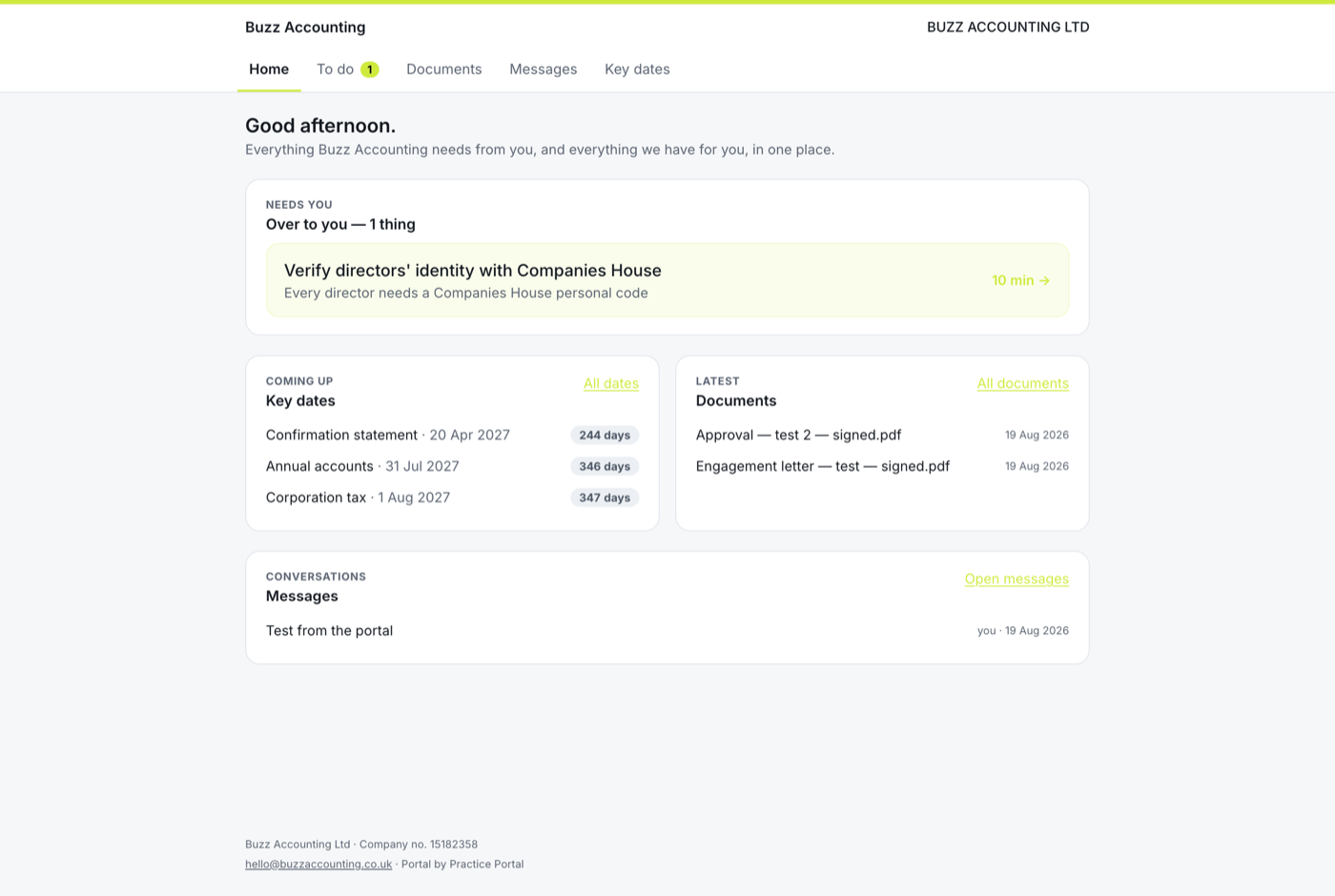
Send a checklist from a template — year-end, VAT quarter, self assessment, new client. The client ticks items off and uploads against them. You see what is outstanding on one screen, and chase with one click.
Everything you send them lives in their portal, sorted, forever. Everything they send you lands on their record with a time stamp. Both of you can find it; neither of you has to ask.
Engagement letters and approvals go out for signature with one click and come back as a PDF with a certificate. You can see who has opened it and who has not.
Add a client by company number and their Companies House dates appear and stay current. Your dashboard shows what is due across the whole practice in the next 30, 90 or 365 days.
One button asks every unverified director to get their Companies House code, tells them exactly how, and records it when they do. You see who is still outstanding before the confirmation statement is due.
A portal under your name, with a code instead of a password, feels like a bigger firm. It is the cheapest way to look like you have your act together, because you do.
Who it's for
You are the firm. Every chase, every resend, every "did you get my email" is you. Starter at £49 a month is less than one chargeable hour and buys back several.
Clients email whoever they like; nobody has the whole picture. Practice at £99 a month puts every client, every request and every date in one place the whole team can see.
Scale without hiring another administrator. Firm at £199 a month takes unlimited clients, 20 team members and, soon, your own domain for the portal.
Why now
Every director must verify and hold a personal code; confirmation statements cannot be filed without it. Firms need a clean way to ask, explain, collect and record — for every client, this year.
Their bank, their solicitor, their GP all have one. An accountant who works by email attachments now looks like the exception — and the larger firms taking your clients have one.
Practice-management platforms want you to move your whole firm onto them. Practice Portal is just the client-facing part — the bit your clients actually see — and sits alongside whatever you already use.
No import project, no IT. The portal reads what Companies House already knows about your clients and builds itself around it.
Upload your logo, pick your colour, add the details that go in the footer. Every screen and every email your clients get is yours from here on.
Year end, accounts and confirmation-statement dates, registered office and directors are pulled from Companies House and kept current every night.
A personal link and a 6-digit emailed code — no password, nothing to reset. From then on, everything you need from them and everything you have for them lives in one place.
The things clients actually email you about, handled in the portal instead.
Clients open their personal link and prove themselves with a code emailed to an address you already hold. Nothing to forget, nothing to reset, nothing for you to support.
File accounts, letters and returns. Ask for bank statements and invoices with a checklist the client ticks off and uploads against. Chase with one click.
Accounts, confirmation statement, corporation tax, VAT — from Companies House and your settings, explained to the client in plain English, refreshed nightly.
Engagement letters and approvals signed with a typed name, timestamp, IP address and a fingerprint of the exact wording — delivered as a PDF to both sides and filed automatically.
Every director now needs a Companies House personal code. The portal asks them, explains how, records it for you and shows you who is still outstanding.
Two-way conversations per client, each one emailing the other side with a link back. Nothing lost in an inbox; everything on the client's record.
Practice Portal grew out of the portal our own accountancy practice runs on. The people who built it answer client emails too — which is why the first thing it does is stop them.
Your logo, colour and name on the portal, on every email, on every signed document. Nothing of ours in front of your clients.
Each firm's clients are separated in the database itself, not just the screen. Files are private and reached only through short-lived links.
Start with one client. Add the rest as you go. Leave any time and take your documents with you.
Monthly, cancel any time, prices exclude VAT. Fourteen days free on every plan — no card to start. These plans are the client portal. Winning new clients is the other half: Growth Engine — website + weekly content, CRM and proposals accepted online — is £129 a month, a website on its own is £99, and everything together is £199.
A sole practitioner or a small team getting clients off email.
Most firms. Room for the whole client list and the whole team.
Larger practices and groups.
The other half
A website that publishes for itself, enquiries landing in a CRM built for practices, and priced proposals accepted online — with the engagement letter signed before you have opened Word. One login, one record, prospect to client.
They open a personal link you send them (or that arrives in any email from the portal) and we email a 6-digit code to an address on their record. A device stays trusted for 30 days. No passwords to create, forget or reset.
Add a client by Companies House number and the portal pulls year end, accounts and confirmation-statement dates, directors and the registered office — and refreshes them every night. Corporation tax and VAT dates are derived from those and your settings. You can add anything else by hand.
Signatures are made by typing a full name and agreeing, from a private link issued to the signer's own email address. The PDF certificate records the name, time, IP address and a SHA-256 fingerprint of the exact wording, so the signed document can always be shown to be the one agreed. That meets the requirements of the Electronic Communications Act 2000 and eIDAS for a simple electronic signature. For anything that needs a witnessed or qualified signature, use the appropriate route.
Yes — paste your firm's engagement letter in with merge fields and send it for signature. We provide a skeleton to show the structure, but the wording is yours: use your professional body's terms.
In a UK (London) database, one row-level-secured tenancy per firm, files in private storage reached only through short-lived signed links. Practice Portal is run by Chivvy Ltd (company no. 17040454).
Your portal lives at app.practiceportal.uk today, branded as your firm on every screen. Your own domain (portal.yourfirm.co.uk) is on the Firm plan and coming soon.
No, and it does not try to. It is the client-facing layer: the portal, the requests, the signing, the dates your clients see. Keep your workflow, tax and bookkeeping software exactly as it is. Most firms that use it were running the client side on email and a shared drive.
About ten minutes for the firm — logo, colour, footer details — and about a minute per client if they are a company (type the number; Companies House does the rest). You do not have to move everyone at once; start with the clients whose records you are chasing this month.
Pick a plan or don't. Nothing is deleted; if you choose a plan later, everything is exactly as you left it.
Create your firm, upload a logo, add a client by company number, send them the link. Fourteen days free, no card.
Start free trial